A Simple Guide to Auto Captions and How They Work
Discover how auto captions work, from the AI that powers them to their benefits for SEO and accessibility. Learn how to use them to grow your audience.
Picture a tireless assistant who listens to every word in your videos and types them out on the fly. That's pretty much what auto captions do. They’re a text version of your audio, created in moments by Artificial Intelligence, and they offer a fast, scalable alternative to the old-school way of doing things.
What Are Auto Captions and Why Do They Matter?
Think of it like having an AI-powered stenographer on standby. A human stenographer is incredibly precise but also slow and expensive. An AI system, on the other hand, zips through an audio track and converts it to text almost instantly.
The magic behind this is a technology called Automatic Speech Recognition (ASR). It's the engine that listens to sound waves, picks out phonetic patterns, and assembles them into words and sentences. It’s so fast that it can turn hours of video into a full text transcript in just a few minutes. That speed is exactly why auto captions are now a go-to tool for everyone from content creators to educators.
Moving Beyond Manual Transcription
Not long ago, creating captions meant someone had to sit, listen, and type out every single word by hand. While that method can be very accurate, it comes with some serious drawbacks.
- Time: Manually transcribing just one hour of video can easily take several hours. It's a real time-sink.
- Cost: Professional transcription services don't come cheap, which puts them out of reach for anyone creating content consistently.
- Scalability: In a world where videos are uploaded every day, the manual process just can’t keep up.
Auto captions break through these barriers by offering a solution that's fast, affordable, and built for modern workflows. They give you a solid first draft that you can quickly polish up, saving a ton of production time.
This shift from manual effort to automated smarts lets creators get back to what they actually enjoy—creating great content. By taking on the heavy lifting of transcription, tools like Typist make it easy to produce accessible, engaging videos without the old headaches of time and cost. What used to be a tedious chore becomes just another simple step in your process.
Ready to see how fast and easy it can be?
Upload a file. Get text back. That simple.
No complex setup, no learning curve. Drag, drop, transcribe
How AI Learns to Understand and Transcribe Speech
Ever wonder how your phone can instantly turn your rambling voice message into a perfectly typed-out text? It’s not magic, but a fascinating process called Automatic Speech Recognition (ASR). Think of it like teaching a toddler to talk. At first, they just hear a jumble of sounds. But with enough exposure, they start picking out patterns, connecting sounds to words, and eventually stringing together full sentences.
AI learns in a very similar way, just at a mind-boggling speed. When you feed it a video file, the AI doesn't hear "words." It "hears" raw sound waves. Its first job is to break down that audio into the smallest possible units of sound, known as phonemes. These are the basic building blocks of any language—like the "k" sound in "cat" or the "sh" in "show." This turns a messy audio stream into a clean, structured sequence of phonetic data that the machine can actually analyze.
From there, the real learning begins. The AI taps into massive language models that have been trained on millions of hours of human speech from podcasts, interviews, audiobooks, and more. By churning through this enormous dataset, it learns which phonemes typically clump together to form words and which words are most likely to follow each other in a sentence.
The Brain Behind the Words
The engine driving all this is machine learning. The AI isn't just following a rigid set of rules someone programmed. It's constantly learning and getting smarter on its own. This is what allows modern ASR systems to be so good at deciphering different accents, navigating background noise, and understanding the unique quirks of individual speakers.
For anyone creating video content, this is important to grasp. A common question is whether screen recording captures audio, and the answer is critical because that audio is the raw material for the AI. The cleaner your audio, the easier it is for the AI to do its job, which means you get a much more accurate caption draft right from the start.
This infographic breaks down how this complex process becomes a simple, powerful tool for creators.
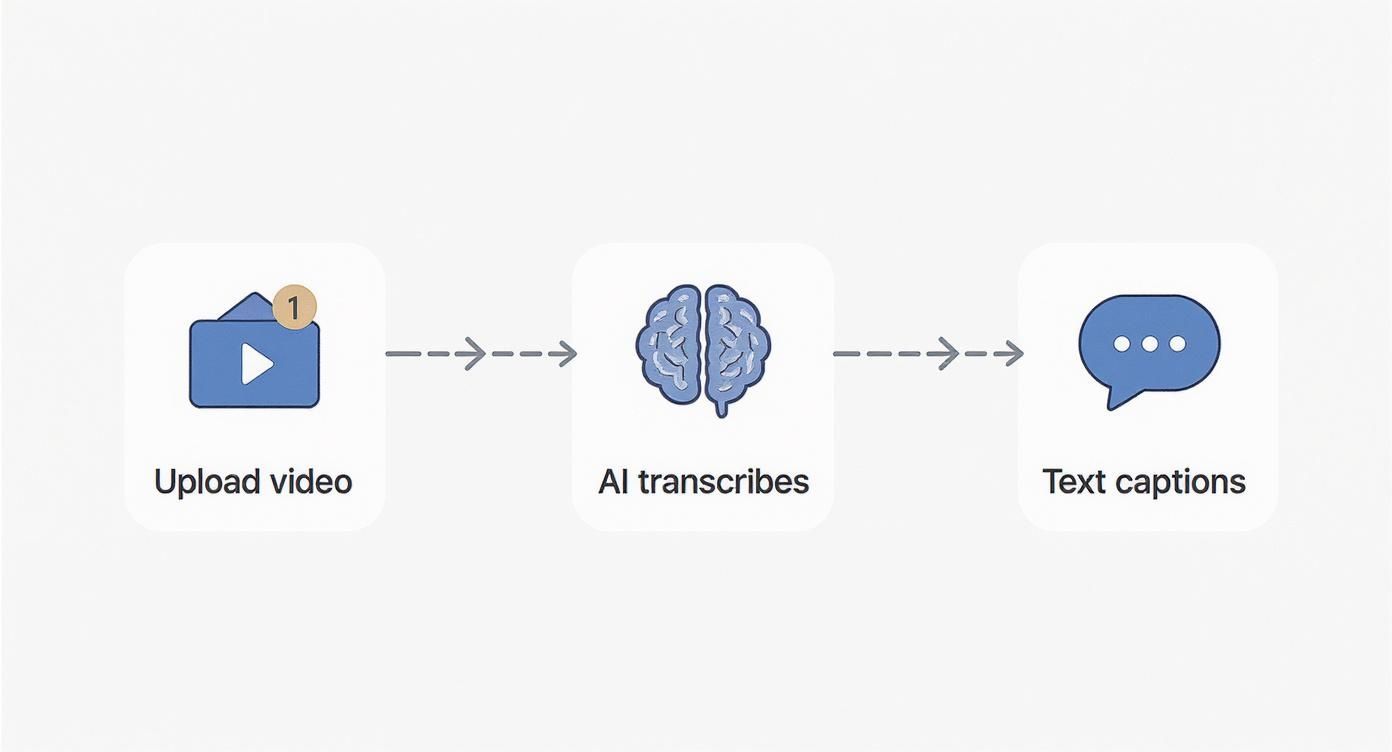
It’s a great visual of how a sophisticated AI workflow is distilled into a few easy steps, from uploading your video to getting a finished transcript.
From Prediction to Polished Text
The final piece of the puzzle is putting all those predicted words together into sentences that actually make sense. The AI doesn't just guess one word at a time in isolation. It looks at the bigger picture, considering the context of the entire phrase to figure out the most probable sequence. It's constantly weighing probabilities, correcting for common stumbles in speech, and even adding basic punctuation.
That’s why today’s ASR systems are accurate enough to be genuinely useful right away. This technology has exploded in recent years, with the global ASR market projected to grow significantly. It’s becoming an essential part of how we interact with digital content.
The real power of ASR lies in its ability to constantly improve. The AI that captions a YouTube video today will be a little bit smarter tomorrow after processing thousands more hours of speech from across the internet.
Tools like Typist are built on this powerful AI to deliver incredibly fast and reliable transcriptions. Instead of spending hours manually typing out captions, you can get a high-quality draft in minutes. This frees you up to spend your time polishing the final product.
If you're curious about the engineering behind it all, you can learn more about how we approached building the fastest AI audio transcription. By turning spoken words into accurate, searchable text, this technology makes your content more accessible and discoverable than ever before.
Try Typist free - Get 3 transcripts daily
Three Ways Auto Captions Grow Your Audience

It’s easy to think of auto captions as just text on a screen, but they're secretly one of the most powerful tools for growing your audience. They work behind the scenes to make your content more inclusive, engaging, and easy to find. Once you see how they do this, it'll change the way you think about your video strategy.
When you treat captions as an afterthought, you're leaving a massive opportunity on the table. Making them part of your workflow isn’t just about ticking a box; it's about actively reaching more people and connecting with them in a real way. Let's break down exactly how this works.
Make Your Content Accessible to Everyone
First and foremost, captions are about accessibility. They open up your content to people who are deaf or hard of hearing, ensuring that your message isn't lost on a huge part of the global audience. It's a significant community that often gets left behind by video-first content.
By providing accurate captions, you're showing that you care about inclusivity. That single act builds a ton of trust and loyalty. When people feel seen and included, they're far more likely to become genuine fans and advocates for your channel.
And it’s not just about hearing loss. Captions also help people with auditory processing disorders or even non-native speakers who rely on the text to keep up. At the end of the day, accessibility is about removing barriers, and captions are one of the simplest and most effective ways to do it.
Boost Engagement in Sound-Off Environments
Think about where you watch videos. On a crowded train? Scrolling through your feed in a quiet office? Late at night next to a sleeping partner? In these "sound-off" situations, a video without captions is basically invisible. Most people will just keep on scrolling.
Auto captions grab a viewer's attention right away, even when the sound is off. They give instant context and pull people into your story from the very first second. That split-second difference is often what makes someone stop and watch instead of flicking past.
This isn't a minor trend; it's how most people consume content now. Many social media users watch videos with captions on, even if they can hear perfectly well.
Simply put, making your content watchable without sound meets your audience where they already are. This one change can lead to longer watch times, better retention, and more shares—all the signals that tell platform algorithms your content is worth showing to more people.
Supercharge Your Video SEO
Search engines like Google are incredible at reading text, but they can't actually watch your video. Without some kind of text, the content of your video is a complete mystery to them. This is where auto captions give you a huge SEO advantage.
When you add captions, you’re basically handing search engines a complete, word-for-word transcript. That text is loaded with all the keywords and phrases that help Google figure out exactly what your video is about.
Suddenly, your video goes from being a black box to a fully searchable piece of content. Here’s what happens:
- Keyword Indexing: Search engines can crawl the entire transcript, letting your video show up for all sorts of specific, long-tail search terms that were only spoken in the audio.
- Topical Relevance: A full transcript provides rich context, signaling to search engines that your video is a valuable, authoritative resource on its topic.
- Increased Discoverability: As your video starts ranking for more keywords, it brings in more organic traffic from search results, introducing a whole new audience to your channel.
When you generate an accurate SRT file, you can upload that valuable text data right alongside your video. It's one of the most effective things you can do to boost your video’s visibility without changing a single frame of the actual content.
Putting Auto Captions to Work in Your Industry
Upload your recording, get a transcript, export to any format. Repurpose content in minutes Start transcribing
Auto captions have grown up. They’ve moved way beyond a simple add-on for social media videos and are now a seriously practical tool solving real problems in a ton of different fields. When you see how people are actually using this tech, its value becomes crystal clear.
For a lot of professionals, auto captions are the secret to boosting efficiency and reaching more people in ways that used to be too expensive or just took too much time. The technology is flexible enough to handle anything from making a college lecture more accessible to untangling complex corporate workflows.
Education and E-Learning
In the world of online learning, if you’re not clear, you’ve lost. That’s why educators and instructional designers are leaning on auto captions to build digital classrooms that work better for everyone.
- Making Lectures Accessible: First and foremost, captions give students who are deaf or hard of hearing the same access as everyone else. But they also help students who just learn differently, or those who are studying in a language that isn't their first.
- Creating Searchable Archives: A video lecture with captions instantly becomes a searchable study guide. A student can just search the transcript to jump straight to a specific topic in a long recording. No more endless scrubbing through the timeline.
- Boosting Comprehension for All: It turns out, captions help almost everyone. Studies have shown that captions can improve focus and help people remember information better, regardless of their hearing ability. Seeing the words while hearing them just clicks for our brains.
This simple addition turns a passive video into an active, searchable learning tool.
Export your transcript to SRT, PDF, DOCX, or TXT — all from one upload Try it free
Corporate Training and Communication
Think about how much video companies create for internal training, new-hire onboarding, or all-hands meetings. Auto captions make sure those messages land clearly and consistently, no matter who is watching.
An HR team can build out a whole library of captioned training videos that new employees can work through on their own time. This is a game-changer for global companies with teams spread across different time zones, languages, and noisy work environments.
When a company captions everything from the CEO's quarterly address to a mandatory safety tutorial, it builds a more inclusive culture. It's a simple way to guarantee no one misses out on critical information.
The payoff is a workforce that's more engaged and better informed because everyone has the same access to the same information.
Media and Content Creation
If you're a journalist, podcaster, or YouTuber, speed is everything. Auto captions give you a way to get timely content out into the world without cutting corners on accessibility or searchability.
Imagine a news outlet covering a breaking story. They can use an automated service to add captions to video clips for social media in minutes, reaching all the people scrolling through their feeds with the sound off. A podcaster can take the transcript from their latest episode and spin it into a blog post or detailed show notes, giving their SEO a nice boost.
Tools like Typist can generate a surprisingly accurate transcript in just a few minutes. From there, it's a quick job to clean it up, export an SRT file, and drop it into YouTube or a video editor like Premiere Pro. It’s a small step that makes content way more engaging and easier to find.
Start transcribing with Typist →
Market and UX Research
Market researchers live and breathe interviews and focus groups. The biggest headache? Manually transcribing hours and hours of audio, which completely stalls the analysis. This is where automated transcription services really shine.
A researcher can upload a dozen interview recordings and get back text versions almost immediately. This lets them quickly search for keywords, spot patterns across conversations, and pull out the perfect quotes to back up their findings. It’s a massive time-saver that means insights get to stakeholders faster than ever before.
How to Perfect Your AI-Generated Captions
AI has made generating captions incredibly fast, but let's be real—it’s not perfect yet. Even the smartest tools can trip up on brand names, industry slang, or thick accents. This is where a little human oversight can turn a decent automated transcript into a flawless, professional one.
Think of your AI captions as a really solid first draft, not the finished piece. The AI does all the heavy lifting, but spending just a few minutes polishing the text is what separates amateur content from something that looks truly professional. It's that final touch that makes sure your message lands exactly as you intended.
This isn't about starting from scratch; it’s about making smart, quick edits. A good tool can make this whole process a breeze. For example, Typist gives you an intuitive editor that syncs the text directly with the audio, so you can listen and fix things on the fly without ever losing your spot.
The Human Touch for Flawless Accuracy
Your first proofread should be a quick hunt for the usual mistakes AI tends to make. They're often tiny errors, but they can completely change the meaning of a sentence or just make your work look sloppy.
Here’s what you should be looking for:
- Proper Nouns: AI often botches the spelling of names, whether it’s people, companies, or products. A quick check makes sure you're giving them the right credit.
- Industry Jargon: If you're in a specialized field, AI might get your technical terms wrong. Correcting these is crucial for your credibility.
- Punctuation and Grammar: Automated systems can sometimes spit out long, rambling sentences or drop commas in weird places. Breaking these up makes your captions far easier to read.
- Homophones: Words that sound alike but mean different things (like "their," "there," and "they're") are classic tripwires for AI.
A quick proofread is your quality control. It’s the essential final check that guarantees your auto captions reflect the professionalism of your brand and the clarity of your message.
This whole review process doesn’t have to be a major time-sink. With a platform like Typist, the audio plays while the text highlights in real-time, making it incredibly simple to spot and fix mistakes in just a few minutes.
Formatting Captions for Readability
Once the words are right, it’s time to think about how they look on screen. The formatting of your captions is just as important as their accuracy. If they’re clunky or hard to follow, people will just tune out.
The goal is to make reading feel completely effortless. You want your audience to absorb the information without even noticing they're reading.
Here are a few simple rules I always follow:
- Break Up Long Sentences: Nobody wants to read a wall of text on a video. Keep your caption blocks to one or two lines, max.
- Check the Timing: Make sure the captions pop up and disappear right when the words are spoken. Good timing feels natural; bad timing is just distracting.
- Ensure Visual Consistency: Stick to one style for your captions throughout the video. It gives your content a clean, professional finish.
An editor built for captioning makes these tweaks easy. With a tool like Typist, you can split long lines with a click and drag timestamps to get the timing just right. It’s this level of control that takes your video from just having captions to being truly accessible and engaging. If you have specific formatting needs or any questions about the platform, feel free to reach out on our contact us page.
Getting Started with Auto Captions Using Typist
Generate subtitles for any video
Upload MP4 or MOV, export SRT subtitles. Works with Premiere, Final Cut, DaVinci
All the theory is great, but putting it into practice is what really counts. The good news is that adding auto captions to your videos doesn't have to be a headache. With the right tool, you can go from a raw video file to a polished, publish-ready transcript in just a few minutes.
This guide will walk you through exactly how to do it using Typist, showing you just how simple creating accessible and engaging content can be. We'll turn what used to be a tedious chore into a quick, three-step process: upload, edit, and export.
Step 1: Upload Your Audio or Video File
First things first, you need to get your file into the system. It’s as easy as dragging and dropping your media right onto the dashboard. Typist is built to handle all the common formats—MP4, MOV, MP3, WAV—so you don't have to mess around with file conversions.
As soon as your file hits the server, the AI gets right to work. It immediately starts analyzing the audio, using the Automatic Speech Recognition (ASR) technology we talked about earlier to generate a solid first draft of your transcript. This part is surprisingly fast; an hour of audio often gets transcribed in just a few minutes.
Step 2: Edit and Refine Your Transcript
Once the AI has done its thing, you’ll have a full transcript waiting for your review. This is your chance to turn a good transcript into a great one. The editor is designed to make this step as painless as possible.
The text is synced with the audio, so as you play your video, the words are highlighted in real-time. This makes it a breeze to catch and fix any small errors, like a misspelled brand name or a bit of industry-specific jargon the AI didn't recognize.
A few minutes of your time here makes all the difference. It’s the human touch that elevates a good AI transcript to a professional-grade one, ensuring your message is clear and accurate.
You can also use this time to improve the flow of your captions. Break up long, clunky sentences into shorter lines that are easier to read. A little polishing goes a long way toward creating a smooth, professional viewing experience.
Transcribe a 1-hour recording in under 30 seconds Try it free
Step 3: Export Your Captions in SRT or VTT Format
With your transcript looking perfect, the last step is to export it in a format video players can actually read. The two industry standards you'll almost always use are SRT and VTT.
- SRT (.srt): This is the old reliable. It's the most widely supported format and works flawlessly on YouTube, LinkedIn, Facebook, and in video editors like Adobe Premiere Pro.
- VTT (.vtt): This is the newer, more modern format built for the web. It offers a few more styling options but isn't quite as universally supported as SRT just yet.
Picking the right one is easy. Typist lets you export your file with a single click, giving you a clean caption file complete with all the text and timestamps needed to sync perfectly with your video. For a closer look at what the platform can do, you can explore more features on the official Typist website.
Got Questions About Auto Captions? We've Got Answers
Even after you get the gist of what auto captions are all about, a few questions tend to pop up. Let's tackle some of the most common ones so you can feel completely comfortable putting this fantastic tool to work.
Getting these details straight will help you understand what the technology can (and can't) do, setting you up for success.
Just How Accurate Are Auto Captions?
These days, modern auto-captioning tools can hit accuracy rates well over 90%, especially with clear audio. It's pretty impressive stuff. That said, things like loud background noise, thick accents, people talking over each other, or very technical jargon can trip the AI up.
This is exactly why a quick once-over by a human is a non-negotiable step. A tool like Typist lets you listen along and fix any little mistakes in seconds. It’s the best way to turn a really good AI draft into a flawless final product.
Do Auto Captions Genuinely Help With SEO?
You bet they do. Search engines are masters at reading text, but they can't actually listen to your video's audio track. When you add captions, you’re essentially handing them a word-for-word transcript packed with keywords.
This gives search engines all the context they need to understand what your video is truly about. The result? Your content starts showing up for a much wider variety of searches, giving your discoverability a major boost.
What's the Real Difference Between Open and Closed Captions?
It all comes down to who has the control: you or your viewer.
- Closed Captions (CC): Your audience can toggle these on or off with a click of a button. Think of the "CC" icon on a YouTube video—that’s the standard.
- Open Captions: These are baked right into the video file itself. They're always on screen, and the viewer can't turn them off.
Most auto-captioning software, Typist included, creates files (like SRTs) for closed captions because they give everyone the most flexibility.
Can I Get Auto Captions for a Live Stream?
Yes, live auto-captioning is a thing, but it’s a different beast. It requires specialized tech that can process audio in real-time. Tools like Typist are built for pre-recorded videos, where the focus is on getting the highest possible accuracy and giving you the chance to edit the captions to perfection. While the core speech-recognition technology is similar, the application for live vs. recorded content is quite different.
One last thing people often wonder about is security. We take protecting your content very seriously at Typist. You can read all about how we handle user data in our privacy policy.