Your Guide to Auto Caption Generator Tools
Discover how an auto caption generator saves time, improves accessibility, and boosts your video SEO. Learn to pick the right tool and get started today.
Ever found yourself watching a video on your phone in a quiet place, like a library or on the bus, with the sound off? You’re not alone. The text popping up at the bottom of the screen is what makes that possible, and that’s where auto caption generators come in.
Simply put, an auto caption generator is a smart tool that listens to the audio in your video and automatically writes out the words as text captions. Think of it as a super-fast transcriptionist that never needs a coffee break, saving you the headache of typing it all out yourself.
What Is an Auto Caption Generator
At its heart, an auto caption generator runs on a technology called Automatic Speech Recognition (ASR). It’s a bit like how your brain works when you listen to someone talk. You hear sounds, your brain processes them, and you instantly understand the words. ASR does the same thing, but for a computer.
The software takes the audio from your video and slices it into tiny, bite-sized pieces. Then, its powerful AI, which has been trained on a massive library of spoken words, gets to work. It plays a high-tech game of "match the sound," connecting the audio patterns to actual words and phrases. The final result is a text file where the dialogue is perfectly synced to pop up on screen right when it’s spoken.
This handy infographic breaks down the journey from spoken word to on-screen text.
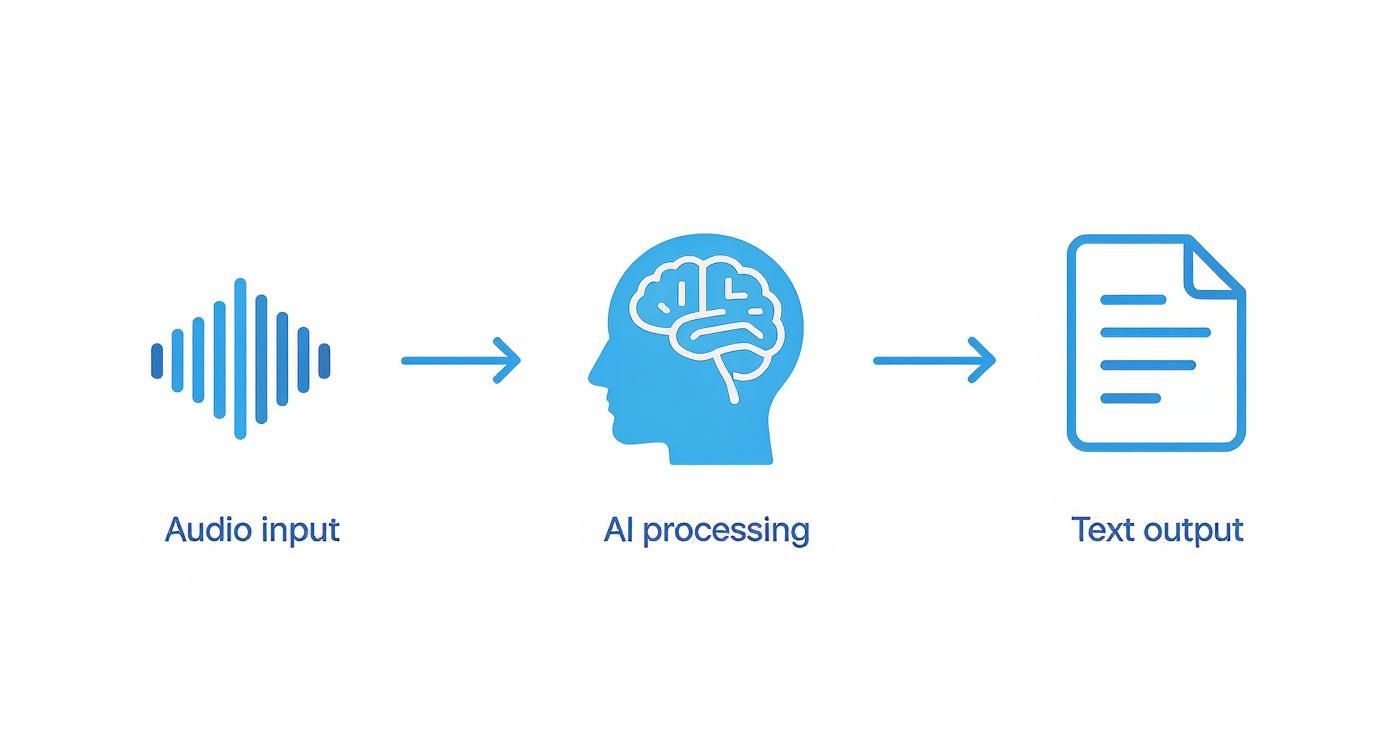
What this really boils down to is efficiency. A tedious manual task that used to take hours can now be done in just a few minutes.
The Power of Automation
The whole point of these tools is to open up your video content to a wider audience without all the manual grunt work. Instead of painstakingly listening, pausing, and typing out every single line, you just upload your video. A service like Typist takes over from there, using AI to deliver an accurate set of captions in a fraction of the time.
This automation is a game-changer for a few key reasons:
- Speed: You can get captions for a long video in minutes, not hours. What used to be an entire afternoon's work is now done before you finish your lunch.
- Accessibility: Captions are essential for viewers who are deaf or hard of hearing. They also make your content accessible to the millions of people who watch videos with the sound off.
- Searchability: Search engines can't watch videos, but they can read text. By turning your spoken words into text, you give Google and other platforms a much better idea of what your content is about, which can help it rank higher.
In today's video-first world, an auto caption generator isn't just a nice-to-have; it's a must-have. It’s the bridge that connects your spoken message to a broader, more engaged audience.
Transcribe a 1-hour recording in under 30 seconds
Upload any audio or video file and get a full transcript with timestamps
From Human Hands to AI Speed: The Story of Captions
It wasn't that long ago that creating captions was a completely manual, often grueling, process. A real person had to listen to every second of a video, type out every word, and then painstakingly line up the text with the right moments on the screen.
Think about it: hours of work for just a few minutes of video. This made captioning a serious bottleneck. For most creators—from solo YouTubers to small businesses—it was simply too slow and too expensive to be practical. It was a specialist's game.
AI Enters the Chat
Then came the auto caption generator, and it changed everything. This wasn't just a small step forward; it was a massive leap, all thanks to artificial intelligence. These new AI models were trained on mountains of spoken language data, learning to pick up on everything from thick accents to niche industry terms with surprising accuracy.
This shift did more than just speed things up. It opened the door for everyone to create accessible, engaging content without needing a Hollywood-sized budget or a team of transcriptionists.
The core technology here is AI-powered transcription. As we covered in our deep dive on building the fastest AI audio transcription, modern tools have completely redefined what’s possible. They can produce highly accurate text in dozens of languages, often in real-time.
What used to take hours now takes seconds. A five-minute video can be captioned in under a minute, freeing up countless hours and making the web a more inclusive place.
Why Your Videos Need Automatic Captions
Upload MP3, WAV, MP4 or any media file — get accurate text back instantly Upload a file
Thinking about captions as just a "nice-to-have" feature is a huge missed opportunity. They’re a core part of making your videos work harder for you, hitting on everything from accessibility and SEO to basic viewer engagement.
First off, let’s talk about accessibility. Captions open up your content to the deaf and hard-of-hearing community, which is a massive win for inclusivity. But it doesn't stop there. Think about all the people watching videos on their commute, in a quiet office, or while their kids are asleep. They’ve got the sound off, and without captions, your message is completely lost.
Boost Your Reach and Engagement
Captions are also a secret weapon for getting your videos discovered. Search engines like Google can't watch a video, but they can absolutely read text. The transcript that an auto caption generator creates is packed with keywords, giving search engines the exact information they need to understand your content and rank it for relevant searches.
This is a game-changer for discoverability. You're no longer just hoping people stumble upon your video; you're actively helping them find it.
A huge chunk of video views on social media happens with the sound completely off. If there are no captions, people just keep scrolling.
And that brings us to engagement, especially on platforms like Instagram and TikTok where videos autoplay on mute. Those first few seconds are critical. Captions grab attention immediately, giving viewers a reason to stop scrolling and actually watch what you've made. It’s all about providing instant context.
Ready to see the difference? Start transcribing with Typist →
Let's break down the advantages in a clearer way.
Core Benefits of Automated Captions
Here’s a simple summary of the key advantages you get when you start using an auto caption generator for your video content.
| Benefit Area | Impact on Your Content |
|---|---|
| Accessibility | Opens your videos to the deaf/hard-of-hearing and silent viewers. |
| SEO & Discoverability | Makes your video content indexable by search engines, boosting organic traffic. |
| Viewer Engagement | Captures attention on mute-by-default platforms, increasing watch time. |
| Comprehension | Helps viewers better understand complex topics or accented speech. |
Ultimately, using a tool like Typist to add captions is a small step that delivers a massive return on your content efforts.
How to Pick the Right Auto Caption Generator for You
Transcription that works in 99+ languages
Accurate results regardless of accent or language — just upload and go
With so many auto caption generators out there, it can be tough to know where to start. But if you cut through the noise and focus on a few key things, you'll find the perfect tool for your needs. Not all captioning software is the same, so let's look at what actually matters.
The absolute most important factor? Accuracy. A tool that constantly bungles words or gets the timing wrong just creates a bigger headache. You’ll spend more time fixing mistakes than you would have spent doing it manually. Look for a service that gets it right the first time, so your editing process is just a quick final polish.
After accuracy, think about how easy the tool is to use. A clunky, confusing editing interface completely defeats the purpose of automation. You need to be able to jump in, make quick corrections, and adjust timings without fighting the software.
Key Features to Look For
Once you've nailed down accuracy and ease of use, a few other features can make a huge difference in your workflow. Don't settle for a tool that just barely gets the job done.
Here’s what to keep an eye out for:
- Multi-Language Support: If you have an international audience (or want one), the ability to generate captions in different languages is a game-changer for expanding your reach.
- Customization Options: Your captions are part of your brand. Look for tools that let you control the font, colors, and overall style to keep everything looking consistent and professional.
- Workflow Integrations: The best tool is one that fits right into how you already work. Make sure it can export in standard formats like SRT, so you can easily pull the files into your video editing software.
The technology behind AI-generated captions is getting better every day, and the gap between machine and human accuracy is shrinking fast. These tools are becoming a standard part of a professional creator's toolkit. To understand more about our commitment to responsible AI, you can always review our privacy policy.
Who Benefits from Automated Captions
Turn podcast episodes into blog posts Start transcribing
You might be surprised by just how many different people rely on auto caption generators. It’s not a niche tool for one specific industry; it’s a powerhouse solution that helps a whole range of professionals solve some of their biggest communication challenges.
For content creators and marketers, captions are no longer optional—they're essential. Think about how you scroll through social media. Videos often autoplay on mute, and captions are what grab your attention and make you stop. They’re the hook that boosts watch time and makes sure your message actually gets heard, even without sound.
Businesses are also getting in on the act, especially for their day-to-day communications. Imagine being able to easily search through an entire webinar or client presentation for a specific keyword. By captioning these recordings, or even internal meetings, you create a searchable archive that’s a goldmine for global teams.
Making Learning More Inclusive
Educators and corporate trainers have found auto captioning to be a massive help in the classroom and beyond. It's one of the simplest ways to build a more inclusive learning environment.
By providing accurate captions for lectures and training videos, educators ensure that learning materials are accessible to students who are deaf or hard of hearing. This also helps them comply with critical accessibility standards.
This simple step ensures everyone has the same opportunity to learn. It’s also a huge help for anyone trying to grasp complex topics or understand a speaker with a heavy accent.
No matter your field, the core benefit is the same: making spoken content easier to access, find, and engage with. A powerful tool like Typist helps close the gap between what you say and what your audience understands.
See how it fits your workflow. Try Typist free - Get 3 transcripts daily
Where is Automated Captioning Technology Headed Next?
Upload MP4 or MOV, export SRT subtitles. Works with Premiere, Final Cut, DaVinci Try it free
The world of automated captions is moving at a breakneck pace, and the next wave of innovation is already taking shape. It’s no longer just about getting the words right. Soon, an auto caption generator will be able to understand and convey the entire emotional context of a conversation.
Just imagine an AI that can pick up on sarcasm, excitement, or hesitation in a speaker's voice and then reflect that nuance in the captions. This kind of emotional intelligence will make captions feel far more authentic and true to the speaker's original intent. We're also seeing huge strides in real-time translation for live streams, which will completely tear down language barriers for creators and their audiences.
Smarter, More Connected Tools
This isn't just wishful thinking; there’s serious money backing this technology. Projections show the subtitle generator market could balloon to USD 3.5 billion by 2033, a massive leap from its USD 1.2 billion valuation in 2024. You can dig into the specifics and read more about these market projections to see just how fast this space is growing.
All this investment is fueling smarter, more integrated tools that will soon be the new standard. Getting on board with a forward-thinking tool now means you'll be perfectly positioned to ride this wave of innovation as it happens. To stay ahead of the curve, you can always find the latest trends and insights over on the Typist blog.
Start transcribing with Typist →
Got Questions? Let's Talk Auto-Captions
Even after seeing all the good stuff these tools can do, you probably still have a few questions floating around. That’s perfectly normal. Let's tackle some of the most common ones I hear about auto caption generators.
Just How Accurate Are These Things?
Honestly, today's AI is pretty remarkable. For clear, crisp audio, you can expect an accuracy rate of over 95%.
But let's be real—AI isn't perfect. That's why the best approach is to treat the generated text as a solid first draft. A great tool will always include a simple editor so you can do a quick once-over. This makes it a breeze to fix any tricky names, brand terms, or specific jargon the AI might have fumbled. It's that final human touch that takes it from good to perfect.
Can I Actually Edit the Captions Myself?
You bet. In fact, if a tool doesn't let you edit, you should probably run the other way.
Any worthwhile auto caption generator will come with an interactive editor. This is where you get the final say. You can easily tweak words, nudge the timing to get it just right, and even style the text to match your brand's look and feel. It’s the best of both worlds: you get the speed of AI automation plus the detailed control of a human editor.
Do I Need a Big Budget for an Auto Caption Generator?
Not at all. A lot of the best tools on the market are incredibly budget-friendly.
Some, like Typist, even have generous free plans to get you started. For example, you can get 3 free transcripts every single day without paying a dime. This puts powerful captioning tech in the hands of everyone, whether you're a solo creator just starting out or part of a larger team.
And if you have bigger needs, you can always get in touch with our team to chat about more customized options.