Finding the Best Audio to Text Converter Software
Searching for the best audio to text converter software? This guide breaks down the key features, use cases, and tips for finding the right tool.
Tired of the endless cycle of pausing, rewinding, and typing out audio? We've all been there. It’s a tedious process that can grind productivity to a halt. That’s why finding the best audio to text converter software feels like such a breakthrough for so many professionals. Top-tier tools like Typist can take hours of recorded audio and turn it into precise, searchable text in just minutes, letting you get back to the work that really matters.
Your Guide to Audio to Text Converter Software

If you’re a content creator, researcher, student, or journalist, you know the headache of manual transcription all too well. It’s a task that eats up your time and demands your full attention, pulling you away from the creative or analytical parts of your job. The real value is in what was said during that interview, lecture, or meeting—not in the thankless job of typing it all out.
This is exactly where audio to text converter software comes in. These tools use powerful artificial intelligence to listen to audio or video and automatically generate a written transcript. It's like having a personal assistant who can type faster and more accurately than any human ever could.
The Power of Automated Transcription
Let’s put it into perspective. Manually transcribing a one-hour interview can easily take you four, maybe five hours of focused work. A good AI tool can get that same job done in a matter of minutes. This isn't just a small improvement; it’s a complete transformation of your workflow.
But the benefits go way beyond just getting your time back. A clean, accurate transcript makes your content so much more useful:
- Searchable: Need to find a specific quote or data point? Just search the text. No more scrubbing through hours of audio.
- Accessible: Transcripts are essential for creating captions, making your content available to audiences who are deaf or hard of hearing.
- Repurposeable: You can effortlessly turn a podcast into a series of blog posts, a webinar into a detailed case study, or meeting minutes into a list of action items.
It's no surprise that this technology is taking off. The global speech-to-text API market was valued at $1.3 billion in 2019 and is expected to hit over $3 billion by 2027. That’s a clear sign of just how vital these tools have become across countless industries.
Still typing out transcripts by hand?
Upload MP3, WAV, MP4 or any media file — get accurate text back instantly
Why This Guide Matters
There are a lot of options out there, and this guide is here to help you cut through the noise and find the best audio to text converter for what you actually do. We’ll walk through the key features that separate a great tool from a mediocre one, look at how people are using them in the real world, and give you practical tips for getting the best results.
You’ll learn what to look for, how to compare your options, and see why a solution like Typist stands out from the crowd. For more helpful tips, you can always check out other articles on the Typist blog. By the time you're done here, you’ll have everything you need to pick a tool that will change the way you work for good.
What to Look for in Transcription Software
Trying to pick the right audio-to-text converter can feel overwhelming. You're flooded with technical jargon and big promises, making it tough to know what actually matters. To cut through the noise, you need to ignore the marketing fluff and zero in on the features that will genuinely make your life easier.
This infographic lays out the most important things to look for.
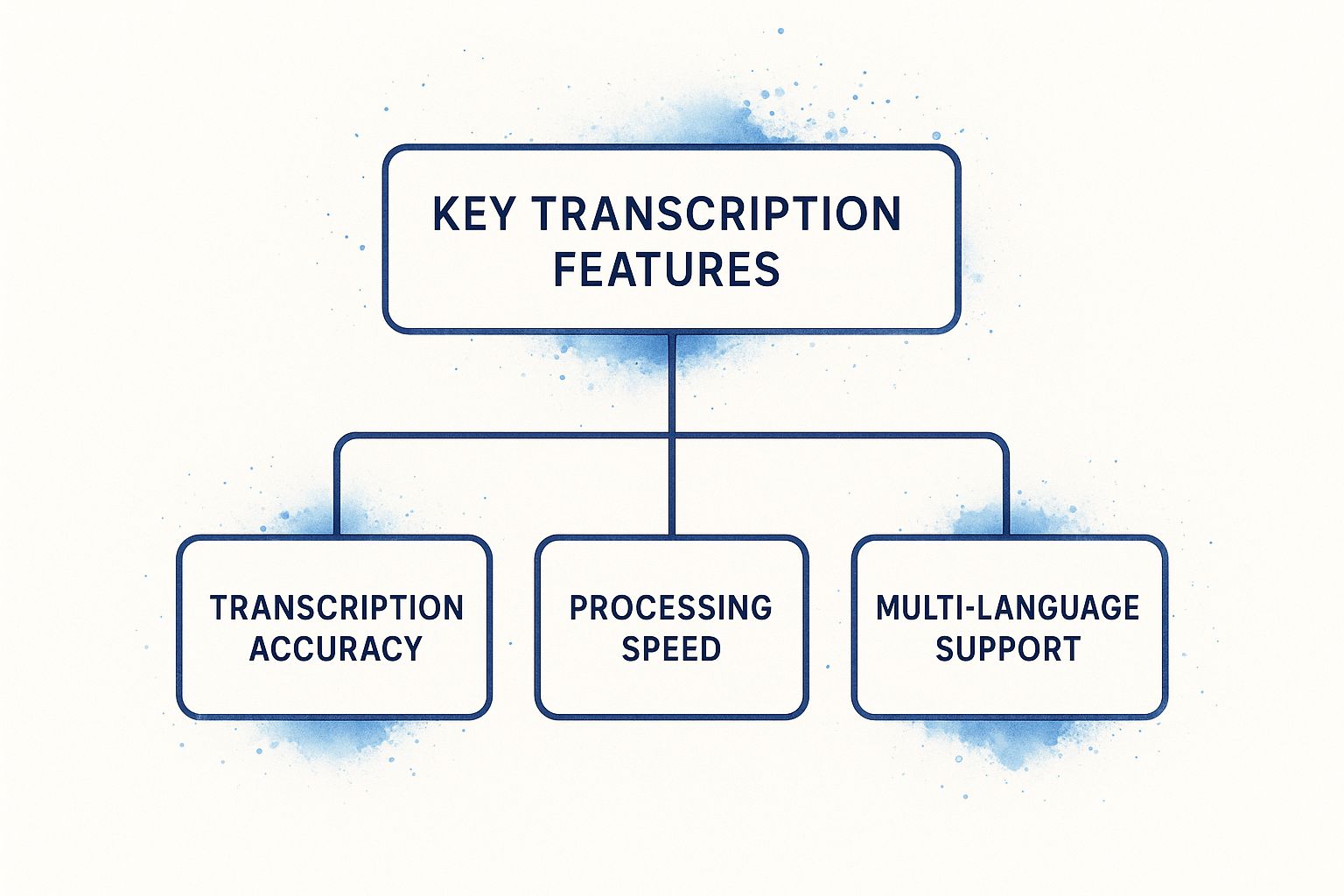
As you can see, accuracy, speed, and language support are the bedrock of any solid transcription tool. Let's dive into what these mean in the real world, along with a few other must-have features.
Transcription Accuracy Is Non-Negotiable
First and foremost, accuracy is everything. A tool that spits out a garbled, inaccurate transcript isn't just unhelpful—it actually creates more work for you. The whole point is to get a text file that's nearly identical to the spoken words, so you spend less time fixing mistakes.
Think of it this way: you wouldn't hire a human transcriptionist who constantly mishears words. The same exact standard should apply to software. The best tools can hit accuracy rates of 95% or higher when the audio is clear.
Of course, the software can only do so much. The quality of your audio plays a huge role in the final result. Things that can trip up even the smartest AI include:
- Background Noise: A loud coffee shop, passing sirens, or a whirring fan can easily muddy the waters.
- Speaker Clarity: Mumbled words, rapid-fire speech, or thick accents are tough for any system to parse.
- Poor Microphones: A recording from a laptop mic across a big room will never be as clear as one from a dedicated microphone.
A top-tier tool is built to navigate these challenges, but giving it clean audio from the start is the best way to guarantee a great transcript.
Processing Speed for a Quick Turnaround
In so many situations, time is money. If you're a journalist on a tight deadline or a marketer trying to get a video out, you can't afford to wait half a day for a transcript. The best software should turn your audio into text in just a fraction of the recording's length.
A one-hour interview, for example, should be ready in a few minutes, not a few hours. This is where you see the real productivity boost. It means you can go straight from recording to editing, writing, or sharing without any frustrating delays holding you back.
Key Takeaway: Speed isn't just a nice-to-have. It’s a core feature that directly impacts your workflow and your ability to get things done on time.
Multi-Language Support for a Global Reach
We live in a connected world, and your work likely reflects that. Whether you're interviewing an expert from another country or creating content for an international audience, you need a tool that speaks their language.
Look for a service that supports a wide range of languages and even different dialects. This gives you the flexibility to handle pretty much any audio file that comes your way. For example, Typist supports over 99 languages, so you can work on projects from all over the globe without juggling multiple tools.
File Formats and Security
Finally, let's talk about the practical side of things. A good tool should be easy to work with. That means it should accept all the common audio and video file formats—like MP3, WAV, MP4, and MOV—so you don't have to waste time converting files first.
The same goes for exporting. You'll need different formats for different purposes:
- .TXT or .DOCX: Ideal for turning a transcript into an article, blog post, or meeting notes.
- .SRT or .VTT: Absolutely essential for creating perfectly timed captions for your videos.
And don't forget about security. If you're transcribing sensitive interviews or private business meetings, you need to know your data is safe. Always choose a provider that's upfront about how they handle your files. You can usually find this information in their data privacy policy, which is always worth a read.
Choosing the right transcription software comes down to evaluating these core features. Before you commit to a tool, it helps to see how they stack up.
Key Features of High-Quality Transcription Software
This table breaks down the essentials, explaining what to look for and why each feature is so important for your day-to-day work.
| Feature | What It Means | Why It Matters for You |
|---|---|---|
| Accuracy Rate | The percentage of words the software transcribes correctly from the audio. | A higher rate (95%+) means far less time spent manually editing and correcting the final text. |
| Transcription Speed | How quickly the software converts an audio file into a text document. | Fast turnaround lets you move on to the next step of your project without frustrating delays. |
| Language Support | The number and variety of languages and dialects the tool can understand. | Gives you the flexibility to work with international content and reach a global audience. |
| File Format Support | The types of audio/video files you can upload and text formats you can export. | Ensures compatibility with your existing workflow and eliminates the need for file conversion. |
| Data Security | The measures taken to protect your uploaded files and personal information. | Crucial for handling sensitive or confidential recordings, ensuring your privacy is respected. |
By keeping these five pillars in mind—accuracy, speed, language support, format flexibility, and security—you'll be able to confidently choose a tool that truly fits your needs and helps you work smarter.
How AI Transcription Unlocks Productivity
Automated transcription isn’t just about saving a bit of time—it fundamentally changes how we interact with spoken content. It takes hours of audio or video that you can only listen to from start to finish and turns it into a searchable, editable, and shareable document. This shift from manual drudgery to automated efficiency is a game-changer for professionals in almost any field.
Think about the old way of doing things. A journalist might spend four hours transcribing a one-hour interview. A podcaster could lose an entire afternoon just typing up show notes. A student might have to re-watch a two-hour lecture just to find a single key concept. In every one of these cases, the valuable information is locked inside the audio, and getting it out is a massive time sink.
Now, imagine that same workflow, but with the best audio to text converter software. The technology acts as a bridge, instantly turning spoken words into text you can actually use. This isn't just about moving faster; it's about unlocking the real value hidden in your audio files.
Try Typist free - Get 60 free minutes
From Tedious Task to Strategic Asset
The real magic of AI transcription is how it reshapes your entire process. What used to be a frustrating bottleneck suddenly becomes a launchpad for creativity and deeper analysis.
Let's look at how this plays out in the real world:
-
For the Journalist: An hour-long interview gets uploaded and transcribed in just a few minutes. Instead of typing word-for-word, the journalist can now search the text to instantly find powerful quotes, double-check facts, and start weaving together a compelling story. The time saved goes directly into better reporting.
-
For the Podcaster: With a single click, a new episode’s audio becomes a full transcript. From that text, they can create accurate subtitles for accessibility, pull out shareable clips for social media, and even write detailed blog posts to boost their SEO.
-
For the Student: A long lecture is transformed into the ultimate study guide. The student can search for keywords, copy-paste definitions directly into their notes, and review tricky topics without having to scrub through the video timeline.
In each scenario, the focus shifts from the chore of transcribing to the purpose of the content. That’s where you find the biggest productivity wins.
Unlocking New Possibilities for Your Content
Beyond making individuals more efficient, automated transcription opens up brand new ways to use your content and make it more accessible. Accurate transcripts are the foundation for closed captions, which are vital for audiences who are deaf or hard of hearing. Adding them can instantly expand your reach. To learn more about how AI is improving accessibility, check out this great resource on Medial V9 and AI Auto Captioning for Accessibility.
This technology is growing at an incredible pace. The mobile speech recognition software market alone is expected to skyrocket in the coming years, highlighting how essential voice tech is becoming in our daily lives, from our cars to our smart home devices.
At its core, AI transcription democratizes information. It takes fleeting spoken words and makes them as solid, searchable, and useful as any written document.
A powerful tool like Typist is built to make this change happen for you. It delivers the speed and accuracy you need to make transcription a seamless part of your workflow, not a dreaded task. The goal is to get you the text you need as fast as possible so you can get back to the creative and analytical work that really matters. If you're curious about the engineering behind it, you can read about building the fastest AI audio transcription service.
Ultimately, the right software doesn’t just convert audio to text; it unlocks potential.
Why Typist Is Your Go-To Transcription Solution
Export your transcript to SRT, PDF, DOCX, or TXT — all from one upload Try it free
When you’re looking for the best audio-to-text converter, you’ll quickly find yourself in a crowded market. A lot of tools promise the world, but the real test is how they actually fit into your daily work. A truly great tool doesn't just convert audio; it melts into your process, saving you time without adding a bunch of new headaches. This is exactly where Typist stands out from the pack.
Typist was built on a simple idea: deliver incredible power without the complexity. It cuts through the clutter to give you what matters most—blazing-fast, super-accurate transcripts you can actually rely on. Forget about fiddling with a dozen confusing settings. Typist offers a clean, straightforward experience that takes you from an audio file to editable text in just a few clicks.
This focus on a smooth user experience means you don't need a degree in audio engineering to get professional-quality results. Whether you're a podcaster prepping show notes, a researcher analyzing interview data, or a student trying to keep up with lectures, Typist just works.
Uncompromising Accuracy and Speed
Let's be honest, the one thing a transcription service has to get right is understanding what’s being said. Typist uses seriously advanced AI to deliver exceptional accuracy, even when the audio is tricky—think multiple speakers talking over each other, technical jargon, or heavy accents. This precision saves you from the soul-crushing task of editing every single line.
Imagine uploading an hour-long interview and getting back a nearly flawless transcript in just a few minutes. That’s what Typist brings to the table. It chews through audio up to 200x faster than real-time playback, transforming what used to be a long, tedious job into a quick step in your workflow. For anyone working against a deadline, that speed is a game-changer.
Key Insight: The true value of a transcription tool isn't just the text it gives you, but the time it gives back. Typist is built from the ground up to maximize that return.
This powerful duo of speed and accuracy means you get a transcript that’s not only ready in a flash but is also dependable. You can confidently use the text for subtitles, articles, or meeting notes without constantly second-guessing its quality.
An Interface Designed for Simplicity
We’ve all used powerful software that was a nightmare to learn. Typist was built to be the exact opposite. The dashboard is clean, simple, and you know exactly what to do the moment you log in: upload your file and let the magic happen.
There are no confusing menus or hidden settings to fight with. This deliberate simplicity keeps your focus on your work, not on learning a new tool. The process couldn't be easier:
- Drag and Drop: Just pull your audio or video file (MP3, WAV, MP4, MOV, and more are supported) onto the page.
- Transcribe: The AI gets to work instantly, processing your file at incredible speed.
- Export: Grab your finished transcript in the format you need, whether it's a TXT, DOCX, or SRT file for video captions.
This friction-free workflow is a core part of the experience. By getting out of your way, Typist helps you stay in your creative zone, making it a tool that genuinely boosts your productivity.
A Generous and Accessible Platform
Getting started with a new tool shouldn't require pulling out your credit card. Typist offers one of the most generous free plans you'll find anywhere, letting you transcribe up to three files every single day without paying a dime. This isn’t a limited-time trial—it's a permanent feature designed to make top-tier transcription available to everyone.
This free access is perfect for students, independent creators, or anyone who just needs a few transcripts here and there. It gives you the chance to see for yourself how it can improve your workflow before you ever consider upgrading.
And when you're ready for more, the premium plan unlocks 125 hours a month and priority processing for a simple, fair price. By focusing on both accessibility and professional power, Typist is the go-to solution for a huge range of people. It’s a powerful tool built for a simple mission: to get you the accurate text you need, as fast as humanly (and artificially) possible. Find out more by exploring the features available at Typist.
Getting the Most Accurate Transcripts Possible
Upload a file. Get text back. That simple.
No complex setup, no learning curve. Drag, drop, transcribe
Picking the right transcription software is a big part of the battle, but it's only half the story. The truth is, the quality of your audio recording is the bedrock of every accurate transcript. I like to think of it like a chef trying to cook a gourmet meal—even the best chef in the world can't make something amazing from spoiled ingredients.
It's the same with AI. Even the smartest software will trip over mumbled words or conversations drowned out by a noisy café. To get those truly fantastic, almost-perfect transcripts, you need to feed the machine clean, clear audio. The good news? You don't need a high-tech recording studio to make a huge difference.
Just by following a few simple best practices, you can radically improve your transcript accuracy and save yourself a ton of editing headaches down the line.
Optimizing Your Audio Before You Hit Record
The absolute easiest way to get a clean transcript is to start with a clean recording. Honestly, a few small tweaks before you start can have a massive impact on the final text, giving the AI the best possible source material to work with.
Here are the fundamentals for capturing clear audio:
- Kill the Background Noise: Find the quietest room you can. Small things you might not even notice, like a humming air conditioner, a conversation in the next room, or passing traffic, can confuse the AI.
- Use a Decent Mic: Your laptop’s built-in mic will do in a pinch, but it's designed to pick up everything in the room. An inexpensive external USB microphone, or even the one on your smartphone's earbuds, will do a much better job of focusing on your voice.
- Get Closer to the Mic: The nearer the speaker is to the microphone, the stronger their voice will be compared to any background chatter. A distance of about six to twelve inches is usually the sweet spot.
- Speak Clearly: This one sounds obvious, but it’s huge. Encourage everyone on the recording to enunciate their words and speak at a steady, moderate pace. Modern tools are pretty good with fast talkers, but clear speech will always win.
These steps aren't complicated, but they are critical. Taking a few extra minutes to set up your recording environment is the single best thing you can do to get highly accurate results.
Streamlining Your Post-Transcription Workflow
Okay, so you've uploaded your high-quality audio and gotten your transcript back. You're not quite done yet. Even with 99% accuracy, you’ll probably want to give the text a quick review. The best audio-to-text converters are designed with features to make this final polish as quick and painless as possible.
Using features like speaker labels and timestamps doesn't just make editing easier. It turns a solid wall of text into a structured, searchable document that you can actually use.
The key is to work with the tool, not against it. Instead of just reading the entire document from top to bottom, let the software's built-in features guide you.
- Speaker Labels: Tools that automatically figure out who is speaking and when (a process called diarization) are a lifesaver. This feature makes it incredibly easy to follow a conversation, which is essential for interviews, meetings, or podcasts with multiple guests.
- Timestamps: Good software links words in the transcript directly back to that exact moment in the audio. If you see a sentence that looks a bit weird, you can just click the timestamp to hear the original audio clip and fix it in seconds.
- Search Functionality: Use the search bar to jump straight to key terms, names, or important topics. This lets you focus your review on the most critical parts of the conversation.
By mastering these simple techniques—both before and after recording—you can make sure you're getting the absolute most out of your software. A great tool like Typist gives you the power, but it’s your good recording habits that give it the quality material it needs to really shine.
Common Questions About Transcription Software
As you get closer to picking an audio-to-text converter, you're bound to have a few questions. That's a good thing. Knowing what to ask helps you set the right expectations and find the tool that actually fits what you need to do.
This section tackles the most common questions we hear. We'll cover everything from accuracy to handling multiple speakers, giving you the last few pieces of the puzzle so you can make a smart choice.
What Level of Accuracy Can I Realistically Expect?
This is the big one, and for good reason—if the transcript isn't accurate, what's the point? For a high-quality audio recording, the best audio to text converter software can hit accuracy rates between 95-99%. That means for every 100 words, you might only have to fix a handful.
But that term "high-quality" is doing a lot of work. Several things can make or break your accuracy:
- Audio Clarity: A crisp, clean recording without a lot of background noise is the single most important factor.
- Speaker Enunciation: Someone speaking clearly at a normal pace will get transcribed far better than someone who mumbles or talks a mile a minute.
- Microphone Quality: Using a decent external microphone makes a world of difference compared to the built-in mic on your laptop from across the room.
- Technical Jargon or Accents: Modern AI is getting much better with specialized terms and different accents, but they can still trip up the software.
Here’s a good rule of thumb: if you have to strain to understand what's being said, the AI will probably struggle, too. Give the software the cleanest audio you can, and you'll get a near-perfect transcript in return.
See how fast and accurate Typist is — upload your first file in seconds Get started
How Does the Software Handle Multiple Speakers?
When you’re transcribing an interview, a team meeting, or a podcast, you need to know who said what. This is where a feature called speaker diarization comes into play. It’s just a fancy term for the software’s ability to tell different voices apart in the same audio file.
Good tools do this automatically. They detect when a new person speaks and label their lines accordingly, usually as "Speaker 1," "Speaker 2," and so on. This turns what would be a confusing wall of text into an organized, easy-to-read conversation. It makes editing so much faster because you can follow the dialogue without having to rewind the audio constantly.
Important Note: For speaker diarization to work well, the voices need to be distinct. If two people have very similar-sounding voices or tend to talk over each other a lot, the system might get a little confused.
What Are the Best Audio File Formats to Use?
A good transcription tool should be flexible. You shouldn't have to waste time wrestling with file converters just to get started. The best services are built to accept a whole range of common audio and video formats.
For the sharpest results, it's always best to use lossless or high-quality compressed formats. These are some of the most common and effective file types:
- Audio: MP3, WAV, M4A, AAC
- Video: MP4, MOV, WMV
Most modern cameras, phones, and recording software export in one of these formats, so you can usually just drag and drop your file and go. A tool like Typist is built to handle all of these and more, making sure your workflow is smooth right from the start.
Try Typist free - Get 60 free minutes
How Is My Data Kept Secure?
Handing your files over to an online service naturally raises questions about privacy and security. This is a huge deal if you’re transcribing sensitive stuff like confidential business meetings, personal interviews, or private research.
Any transcription provider worth its salt takes security seriously. Look for services that are open and honest about how they protect your data. Here are the key things to check for:
- Secure Encryption: Your files should be encrypted both while they're being uploaded and while they're stored on the server.
- Clear Privacy Policies: The company should spell out exactly how your data is used, who can access it, and promise not to share it.
- Data Deletion Options: You should always have control. Look for the ability to permanently delete your files from their servers whenever you want.
Always go with a service that puts your privacy first. If you have any specific concerns about how your data is handled, don’t hesitate to reach out to their support team. You can find more details or ask a question directly via our contact page.
Now that you have a clearer picture of what to look for, you're in a much better position to choose and use transcription software. Typist was designed to nail all of these things—delivering top-tier accuracy, clean speaker identification, wide format support, and rock-solid security.
Never miss a word from lectures or interviews Try it free