Automatic Transcribing Software Explained Simply
Discover how automatic transcribing software turns speech into text. This guide explains the AI, features, and how to choose the right tool for your needs.
Ever found yourself staring at a mountain of audio files—hours of interviews, meetings, or lectures—knowing you need a written record by tomorrow? In the past, this meant strapping on a pair of headphones and bracing for days of tedious, manual typing. But that's no longer the case. Automatic transcribing software has stepped in, using AI to turn spoken words into accurate, searchable text in just a few minutes. It's completely changing the game for professionals everywhere.
From Sound Waves to Searchable Text
At its heart, automatic transcribing software is a digital assistant that listens to your audio or video files and types out everything it hears. Think of it as a bridge between the world of spoken sound and the world of written text. Instead of a person constantly hitting play, pause, rewind, and type, a smart algorithm handles all the heavy lifting at incredible speed.
But this technology does more than just save time. It unlocks the value trapped inside your recordings. A spoken conversation is temporary, but a written transcript becomes a permanent, searchable, and shareable asset. Suddenly, you can find that one key quote instantly, analyze patterns in customer feedback, or create accessible content for a much wider audience.
The Growing Demand for Automated Transcription
The move toward this technology isn't just a small trend—it's a massive global shift. Professionals in journalism, healthcare, academic research, and content creation are all embracing these tools to get more done. This widespread adoption is fueling some serious market growth.
The global AI transcription market is on a steep upward climb, expected to grow from USD 4.5 billion in 2024 to about USD 19.2 billion by 2034. That's a compound annual growth rate of 15.6%. North America is currently leading the pack, making up over 35.2% of the market. You can dig into more of the numbers on this impressive growth from market.us.
So, let's dive into how this all works. In this guide, we'll walk through the technology behind it, the features that matter most, and how you can pick the perfect tool for your needs.
We’ll cover:
- The AI Under the Hood: How does software actually learn to understand human speech?
- Key Features to Look For: What separates a basic tool from a powerful one.
- Real-World Applications: How different industries are putting transcription to work.
- Choosing the Right Platform: A practical checklist for making a smart decision.
By turning spoken words into structured data, automatic transcribing software makes information more accessible and actionable. It converts passive audio files into active resources you can search, edit, and analyze.
Ultimately, whether you're a journalist on a tight deadline, a researcher poring over interviews, or a podcaster creating show notes, getting a handle on automatic transcription is essential. It lets you offload the grunt work and focus on what you do best. This guide will give you everything you need to know to get started.
How AI Learns to Understand Your Voice
See how fast and accurate Typist is — upload your first file in seconds Get started
Ever wonder how your spoken words magically appear as text on a screen? It's not quite magic, but it’s a fascinating process that’s a bit like teaching someone a new language from scratch. The AI has to learn how to listen, interpret, and then write—all in a fraction of a second.
It all starts with sound. When you speak, your voice creates sound waves that a microphone picks up. To the software, this isn't "words" just yet; it's a raw, messy stream of audio data. The first big job is to chop that stream into smaller, more understandable pieces.
From Sound Waves to Phonemes
The first piece of the puzzle is the acoustic model. You can think of this as the AI’s ear. Its main role is to take that raw audio and break it down into the smallest units of sound that make a difference in a language. These little sound-bites are called phonemes.
For example, the word “cat” is built from three phonemes: the "k" sound, the "æ" sound, and the "t" sound. The acoustic model gets good at this by being trained on millions of hours of audio where humans have already labeled these sounds. This is how it learns to pick out phonemes, even with different accents, pitches, and speaking speeds.
This diagram shows how a sound wave gets broken down into its phonetic parts before being reassembled into text.
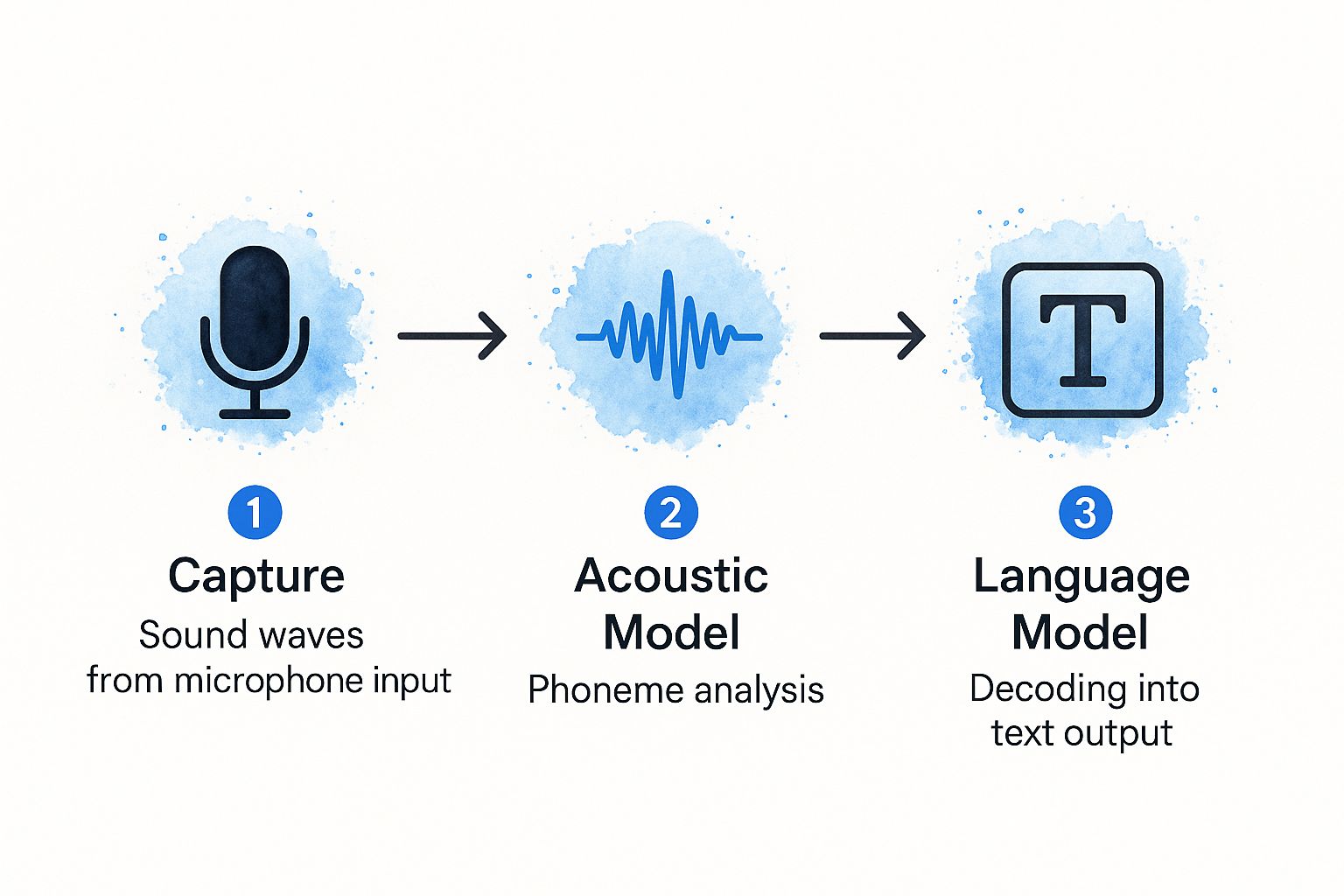
It gives you a clear look at the journey from raw audio to finished text, showing how the acoustic and language models work together.
Once the phonemes are identified, the AI has a string of sounds, but not actual words. It might hear the sounds for "eye," "like," and "ice cream," but it could also interpret them as "I," "like," and "I scream." That ambiguity is where the next part of the system steps in.
Assembling Words with a Language Model
Next up is the language model, which is basically the AI’s brain. This model is a massive statistical database of words and phrases. It’s been fed enormous amounts of text—books, articles, websites—to learn which words are most likely to appear next to each other.
So, when it sees our string of phonemes, the language model knows that the phrase "I like ice cream" is way more common and statistically probable than "eye like ice cream." It uses this context to string the phonemes together into the most logical sequence of words.
This is how the system makes smart decisions, clearing up confusion and creating a transcript that actually makes sense. It's the reason a good transcription tool can figure out the difference between "to," "too," and "two" based on the rest of the sentence. If you want to get really technical, we have an entire article on building the fastest AI audio transcription that goes deep into the engineering side of things.
The real secret sauce of a modern transcription AI is how the acoustic and language models work together. The acoustic model hears the sounds, and the language model provides the context to turn them into accurate words.
The Role of Deep Learning and Neural Networks
All of this is powered by deep neural networks, a type of AI that’s loosely inspired by the structure of the human brain. These systems aren't explicitly programmed with grammar rules; they learn by example. Engineers feed them huge datasets of audio files along with perfect, human-made transcripts.
Through this training, the network teaches itself to spot patterns. It fine-tunes millions of internal connections to get better and better at its job. This helps it master things like:
- Filtering out background noise: Learning to ignore an office hum or a passing siren.
- Handling different accents: Understanding that the same word can sound very different depending on who’s speaking.
- Understanding technical jargon: Picking up on specialized terms used in fields like medicine or law.
This continuous learning process is what allows an automatic transcribing tool like Typist to hit accuracy rates above 95% on clear audio. The more varied the training data, the smarter the AI gets, making it incredibly capable of handling the messy reality of real-world recordings.
Must-Have Features in Modern Transcription Tools
Still typing out transcripts by hand?
Upload MP3, WAV, MP4 or any media file — get accurate text back instantly
Knowing how the AI works is one thing, but knowing what to look for in a tool is what really matters in your day-to-day work. Let's be clear: not all automatic transcribing software is created equal. The best platforms go way beyond basic speech-to-text, offering a whole set of features that make your workflow faster, easier, and more accurate.
It’s a bit like buying a car. Sure, the engine is crucial, but it's the features—the GPS, cruise control, and Bluetooth—that make the drive enjoyable and effortless. In the transcription world, these extras are what turn a raw, messy text file into a polished, usable document.
Let's break down the features you should absolutely expect from any top-tier service.
Speaker Identification and Diarization
Imagine trying to read a script from a meeting where every single line is just labeled "SPEAKER." Total chaos, right? This is exactly why speaker diarization (sometimes called speaker identification) is a non-negotiable feature.
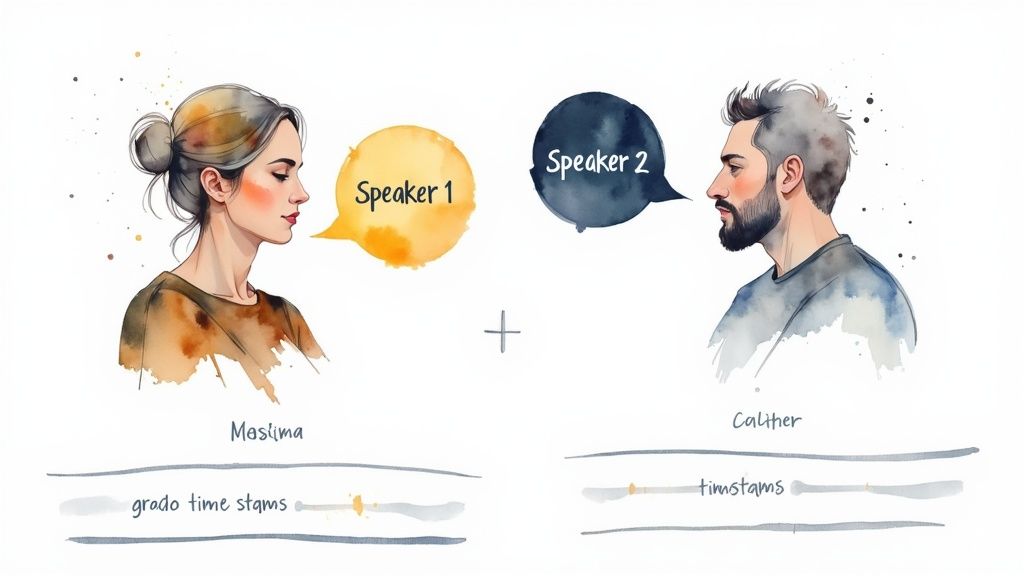
This clever bit of tech analyzes the unique vocal patterns in your audio to automatically figure out who is speaking and when. For a journalist transcribing a two-person interview or a researcher analyzing a focus group, this is a lifesaver. It cleanly separates the dialogue, making the transcript a breeze to read and quote. A good tool will assign labels like "Speaker 1" and "Speaker 2" or even let you pop in their actual names.
Without it, you'd be stuck spending hours manually listening and labeling each speaker, which kind of defeats the whole point of using an automatic tool.
A transcript without clear speaker labels is just a wall of text. Speaker diarization adds the essential context of a conversation, turning a monologue into a dialogue and making the content instantly make sense.
Precision Timestamps
Another absolute must-have is automatic timestamping. This feature links every word or phrase in the transcript back to its exact moment in the audio or video. If you’ve ever wasted time scrubbing through an hour-long recording just to find one specific quote, you know how maddening that can be.
With timestamps, you just click on a word in the text, and the audio player zips you directly to that spot. This makes editing and fact-checking incredibly fast. You can quickly double-check any parts where the AI might have stumbled, ensuring your final transcript is 100% accurate without the headache of rewinding and replaying.
For anyone creating content, this is a huge win. When you're making video subtitles (SRT files) or audiograms for social media, precise timestamps are the backbone of the whole operation. They make sure your captions sync up perfectly with what’s being said on screen.
Custom Vocabulary and Dictionaries
Every industry, company, and niche has its own lingo. A doctor might talk about "bradycardia," a tech team might discuss their "proprietary API," and a podcaster will mention their sponsors by name. A generic AI model is going to trip over these specific terms, leading to frustrating (and sometimes hilarious) mistakes.
This is why the ability to add a custom vocabulary is so important. The best automatic transcribing software lets you build a personalized dictionary of names, acronyms, brand jargon, and technical terms.
- For Researchers: Add the names of specific theories or academics.
- For Marketers: Include your company and product names to make sure they're never misspelled.
- For Legal Professionals: Input complex legal terminology for flawless deposition transcripts.
By teaching the AI your specific language, you dramatically boost its accuracy from the very first file you upload. It’s a small step that saves you a ton of time cleaning up the final text.
Seamless Integrations and Export Options
Finally, a great transcription tool shouldn't be an island; it should fit right into your existing workflow. The ability to connect with other platforms and export files in different formats is a sign of a well-thought-out service. Look for integrations with cloud storage like Google Drive or Dropbox, which can automate the whole process of getting your files ready for transcription.
Just as important are the export options. You need to be able to download your finished transcript in whatever format your project requires.
- .TXT: For a simple, no-frills plain-text version.
- .DOCX: For easy editing in Microsoft Word or Google Docs.
- .SRT: The industry standard for video captions and subtitles.
- .PDF: For a clean, shareable final document that can’t be easily edited.
Platforms like Typist really shine here, offering a wide range of export formats that make it simple to move your transcript to the next stage of your project—whether that's a video editor, a content management system, or a research archive.
See How Different Industries Use Transcription AI
Transcription that works in 99+ languages Start transcribing

The real magic of automatic transcription software isn't just what it does, but where it does it. This isn't a niche tool for one specific job; it’s a remarkably versatile solution that adapts to the unique pressures and workflows of countless professions.
From hectic newsrooms to meticulous research labs, AI transcription is fundamentally changing how people handle spoken information. It takes the messy, unstructured nature of audio and video and turns it into clean, organized text that’s easy to search, edit, and share. Let's look at a few real-world examples to see how this plays out day-to-day.
Speeding Up the News Cycle for Journalists
In journalism, time is the ultimate currency. An incredible interview with a key source is useless until you can pull out the quotes and build a story around them. The old way—manually typing out a one-hour recording—could easily eat up four or five hours. That’s an eternity when a story is breaking.
This is where automatic transcribing software changes the game. A reporter can upload their audio and get a full, timestamped transcript back in just a few minutes. Suddenly, they can:
- Jump straight to key quotes using a simple text search instead of endlessly scrubbing through audio.
- Fact-check in seconds by clicking a timestamp to hear the original audio for that specific phrase.
- Share drafts with editors for lightning-fast collaboration and review.
The result is a workflow that's been put on hyperdrive. A task that used to kill half a day is now done in the time it takes to grab a coffee. This frees journalists to do what they do best: write and report.
Improving Patient Care in Healthcare
Healthcare is another field feeling a massive impact. Doctors and clinicians are drowning in administrative work, and patient notes are a huge part of that. Dictating notes and having them automatically transcribed lets them capture crucial details while they're still fresh in their minds, without getting bogged down.
This shift is fueling some serious growth. The medical transcription software market was valued at around USD 2.55 billion in 2024 and is expected to climb to USD 8.41 billion by 2032—that's a growth rate of about 16.3% every year. North America is leading the charge, holding nearly 45.5% of the market, thanks in large part to the widespread adoption of Electronic Health Records (EHR). You can find more details about the medical transcription market growth on fortunebusinessinsights.com.
By automating clinical documentation, doctors can reduce administrative burdens, minimize the risk of burnout, and dedicate more focused attention to patient care, leading to better health outcomes.
Ultimately, this technology means more face-to-face time with patients, more accurate medical records, and a healthcare system that runs just a little bit smoother for everyone.
Empowering Researchers and Students
In the academic world, research often depends on analyzing hours of interviews, focus groups, and lectures. For a researcher, transcribing all that qualitative data is the first—and most grueling—step. For students, having searchable lecture notes can be the difference between acing an exam and falling behind.
Automatic transcription software simply wipes this bottleneck off the map. A researcher can get transcripts for dozens of interviews ready for analysis in a single afternoon. A student can turn a whole semester of recorded lectures into a fully searchable study guide.
The benefits are straightforward:
- Accelerated Research Timelines: The gap between collecting data and actually analyzing it shrinks dramatically.
- Enhanced Learning: It creates study materials that are accessible and easy to navigate for all students.
- Improved Accuracy: Nothing gets lost in translation. A verbatim record ensures every detail is captured.
Streamlining Legal Proceedings
The legal field is built on a mountain of documentation. Accurate transcripts of depositions, witness statements, and court hearings are non-negotiable. Traditionally, this has been the work of highly skilled (and very expensive) court reporters.
While human experts are still essential for official, certified records, AI transcription offers a fast and affordable solution for everything else. Law firms can use it to create draft transcripts for case prep, review client meetings, or analyze audio evidence. It’s a cost-effective way to manage the sheer volume of audio that legal work generates, putting key information at the fingertips of the entire team.
How to Choose the Right Transcription Software
Upload your recording, get a transcript, export to any format. Repurpose content in minutes Start transcribing
Trying to find the right automatic transcribing software can feel like you're lost in a sea of options. But here’s the secret: it really just comes down to a few key things. Think of it like picking out a new car. You wouldn't buy a two-seater sports car if you need to haul around a family of five. The perfect tool for you depends entirely on what you're doing, your budget, and how transcripts fit into your day-to-day work.
If you focus on a handful of crucial factors, you can easily filter out the noise and find a platform that feels like it was made just for you. Let's walk through exactly what to look for, so you can pick a service that not only gets the job done but actually makes your life easier from the get-go.
How Accurate Does It Really Need to Be?
Accuracy is the name of the game for any transcription tool, but "good enough" means something different to everyone. If you’re a student transcribing a lecture for your own study notes, 95% accuracy is probably fantastic. But if you're a lawyer preparing a transcript for a deposition, a single wrong word could have massive consequences.
You have to think about the stakes. Is the audio crystal clear, or is it full of background noise, technical jargon, and people talking over each other? High-stakes situations demand the highest possible accuracy. That's where a tool like Typist, which is built for precision with really complex audio, shines. On the flip side, if you just need a rough draft of internal meeting notes, you might be happy to trade a bit of accuracy for a lower price.
Let’s Talk Money: Comparing Pricing Models
Transcription software usually comes in one of two flavors, and the best one for you is all about how often you'll be using it.
- Pay-As-You-Go (Per Minute/Hour): This is perfect if you only need transcriptions every once in a while. Got an occasional interview or a one-off meeting? Paying by the minute is almost always the cheapest way to go. You only pay for what you actually use, no strings attached.
- Monthly Subscription: If you’re a podcaster, researcher, or content creator with a steady stream of audio, a subscription plan is your best friend. These plans typically give you a big block of transcription hours for a flat monthly fee, which can dramatically lower your cost per minute.
Choosing the right pricing model is a strategic move. A subscription can save a heavy user hundreds of dollars a year, while pay-as-you-go keeps a casual user from paying for something they barely touch.
Don't Overlook Security and Privacy
When you upload your files, you’re handing your data over to a company. For a lot of people—especially in fields like healthcare, law, or journalism—that data can be extremely sensitive. Security isn't just a nice-to-have feature; it's an absolute must.
Before you sign up for anything, read the privacy policy. I mean really read it. Look for clear language about end-to-end encryption, which is the gold standard for protecting your files while they’re being uploaded and while they're stored. Good providers are completely transparent about how they handle your data and will always give you the option to permanently delete your files. Never, ever trade security for a lower price—the risk just isn't worth it.
A Handy Checklist to Help You Decide
Making the final call is a lot easier when you can compare your top contenders side-by-side. I've put together this simple checklist to help you evaluate each tool and see how they stack up.
A clear, objective comparison helps cut through the marketing fluff. This checklist is designed to help you do just that.
Software Selection Checklist
| Evaluation Criteria | What to Look For | Why It Matters |
|---|---|---|
| Accuracy Rate | Does it handle accents, background noise, and technical terms well? | High accuracy means less time spent fixing mistakes. |
| Pricing Structure | Is it pay-per-minute or a subscription? Does it fit your usage frequency? | This aligns the cost with your budget and workflow, so you don't overpay. |
| Data Security | Does the provider offer end-to-end encryption and a clear privacy policy? | This protects your sensitive information from getting into the wrong hands. |
| User Interface (UI) | Is the platform easy to figure out? Is the editor simple to use? | A clean, intuitive design makes the whole process faster and less of a headache. |
| Key Features | Does it offer speaker identification, custom vocabulary, and multiple export formats? | The right features can seriously speed up your workflow and give you a better final product. |
| Customer Support | Is there a real, responsive support team you can contact if something goes wrong? | Good support is priceless when you’re on a deadline and need help. |
By using this framework, you can get past the shiny promises on a company's homepage and focus on what will actually affect your work. The goal is to find an automatic transcribing software that not only gives you accurate text but also slots right into your process, saving you time and frustration on every single project.
Ready to Start Your Transcription Journey?
Generate subtitles for any video
Upload MP4 or MOV, export SRT subtitles. Works with Premiere, Final Cut, DaVinci
So, there you have it. Automatic transcription software has clearly evolved from a sci-fi concept into a must-have tool for anyone dealing with audio and video content. The path from spoken words to searchable text is no longer a major hurdle; it’s a simple, practical step that can save you an incredible amount of time.
Now that you understand the AI behind it, know what features to look for, and have a good idea of how to pick the right platform, you're ready to completely change how you work. This technology is only getting better, and its role in our professional lives will continue to grow. The next step isn't just to know about it—it's to try it.
Time to Put It to the Test
The best way to see the real value of any tool is to actually use it. It's one thing to read about saving time, but it’s another thing entirely to get hours back on your next project. It's time to experience the difference for yourself.
I always encourage people to just dive in and see the efficiency firsthand. Here’s a quick way to get started:
- Find a Real File: Grab a recording from a recent meeting, interview, or lecture you've been putting off transcribing.
- Give It a Go: Upload it to a user-friendly platform and see just how fast you get a draft back.
- Clean It Up: Use the built-in editor to make any quick fixes. You'll see right away how synced timestamps make this part a breeze.
Getting your hands dirty like this is the fastest way to truly understand how much more productive you can be.
The biggest productivity gains come from taking that first practical step. Trying out an automatic transcription tool on one of your own tasks takes it from a neat idea to a real-world solution, showing you instantly how much effort you can save.
Instead of dreading the thought of manual typing, you could have a finished transcript ready for that article, report, or video you're working on. To start saving time right now, you can explore an advanced transcription tool like Typist and see the impact on your very next project.
Got Questions? We've Got Answers
If you're new to automatic transcription, you probably have a few questions. Let's clear up some of the most common ones so you can see how this technology works and what to look for in a great tool.
Just How Accurate Is This Stuff?
It’s surprisingly good. For clear audio, you can expect accuracy in the 90% to 99% range. But that number isn't set in stone.
Things like heavy background noise, thick accents, or people talking over each other can trip up the AI. That’s why the best platforms don’t just spit out a text file and call it a day. They give you a simple editor, making it easy to listen back and polish any rough spots. The goal is a perfect transcript without a ton of effort.
Can It Tell Who's Talking in a Group Conversation?
Absolutely. The top tools have a feature built just for this, and it’s called speaker diarization.
Instead of giving you a giant, confusing block of text, speaker diarization figures out when the speaker changes and labels them (e.g., "Speaker 1," "Speaker 2"). This is a game-changer for transcribing meetings, interviews, or podcasts. It turns a messy conversation into a clean, easy-to-read script.
When it comes to AI vs. human transcription, it really boils down to two things: speed and cost. An AI-powered tool gives you a transcript in minutes for a tiny fraction of the price. Human services can sometimes catch more nuance in really difficult audio, but they are dramatically slower and much more expensive.
How Do I Know My Files Are Safe?
This is a big one. Your audio and video files can contain sensitive stuff, so security should be a top priority for any transcription service you use.
Always look for platforms that mention features like end-to-end encryption. This keeps your files protected from the moment you upload them. A trustworthy company will also have a straightforward privacy policy that tells you exactly how they handle your data. If they aren't clear about security, walk away.
The demand for these services is skyrocketing for a reason. In the U.S. alone, the general transcription market is expected to blow past USD 32 billion by 2025 and is on a path to hit over USD 50 billion by the mid-2030s. This growth includes massive specialized fields like legal and medical transcription. You can find more details in this breakdown of the transcription services market.
Ready to see it in action? Typist turns your audio and video into text you can search and edit in just a few clicks. Stop manually typing and start getting things done. Try Typist for free and get your first transcript in minutes!
Article created using Outrank